
When you purchase through links on our site, we may earn an affiliate commission. This doesn’t affect our editorial independence.
Streaming giant Spotify is at last introducing high-quality audio, referred to as lossless audio, for its premium users. The firm is launching the high-definition, CD-quality streaming audio in approximately 50 nations globally within the next two months. Customers in the United States have already been given access. Premium subscribers will have access to lossless audio at no extra cost.
Spotify stated that almost the entirety of its 100 million song collection will be accessible in lossless format, a feature that has been highly expected. An announcement was made in 2021 regarding an imminent rollout of lossless audio. However, the plan was subsequently paused. Competitors like Apple Music and Amazon Music have provided lossless_audio for several years.
What Makes Lossless Audio so Excellent?
Music lovers favour lossless_audio as it provides a full audio rendering of the original sound without any loss or compression. It does not sacrifice sound quality. Moreover, obtaining lossless audio streaming is becoming increasingly affordable, whereas it was once costly.
Check Out Previous Posts on this Site
YouTube Launches Tool For AI-generated Background Music For Content Creators
Availability of Lossless Audio
Premium users will be notified when lossless audio is available in the Spotify app. Lossless_audio is being introduced progressively to over 50 markets throughout October. According to the company, Spotify Premium subscribers in the U.S. have begun to receive access to the feature. Other countries where users have accessed this feature include Australia, Austria, Czechia, Denmark, Germany, Japan and New Zealand. Also, many Spotify premium subscribers in the Netherlands, Portugal, Sweden, and the U.K. have been given access.
Enabling Lossless Audio on Spotify
If your Spotify account has been given access to lossless_audio, you can activate it easily by following these steps:
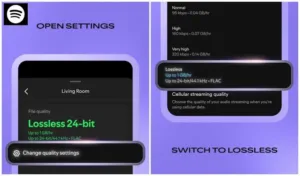
Image credit: Comical Penguin on YouTube
Tap your profile icon on the top left
Go to Settings & Privacy → Media Quality
Select: Enable lossless_audio for Wi-Fi and cellular.
Spotify suggests streaming lossless music over Wi-Fi. Also, it recommends using wired headphones or speakers instead of using a Bluetooth device. Bluetooth cannot support the bandwidth required for transmitting lossless audio. For this reason, the system must compress the signal before transmission. Also, the feature must be activated manually on every device you use.