
When you purchase through links on our site, we may earn an affiliate commission. This doesn’t affect our editorial independence.
As more children now have smartphones, parents are increasingly worried about their kids’ online safety. Popular social media platforms like WhatsApp, Snapchat, Instagram lack inbuilt parental controls. For this reason, children using these platforms are sometimes exposed to harmful contents. This why parents need to try a parental control app like AirDroid Parental Control.
Parental control applications enable you to authorise which apps and games are permitted. Also, you can set screen-time restrictions, and completely restrict activity when it’s time for studying or rest. AirDroid Parental Control includes all the necessary tools to ensure your child’s online safety and to oversee their actions. It provides fundamental features such as app/website blocking, geofencing, screen time restrictions, and activity reports.
Also, some other advanced features exclusive to the Android version of the app include outstanding remote-viewing tools. These include live screen mirroring, remote camera access, and one-way audio.
AirDroid Features for Parental Control
Below are several qualities that establish AirDroid Parental Control as one of the top solutions for ensuring your children’s online safety.
1. Real-Time Screen Mirroring
Live Screen Mirroring is one of several remote monitoring features offered by AirDroid. This feature allows you to see what your child is doing on their device or what’s happening in their environment. This features works by mirroring your child’s phone, displaying their smartphone activities in real-time to you.
2. Remote Camera
This is a distinct remote monitoring feature offered on AirDroid. The Remote Camera allows you to view the camera on your child’s device, providing a glimpse into their environment. This may help guarantee their safety. You can remotely switch between the front and back cameras and adjust the camera’s orientation.
3. Audio Snooping
This is yet another remote tracking capability offered by AirDroid. This incredible feature enables you to remotely access the microphone on your children’s smartphones. This can help you to listen to the noises around them and ensure their safety.
4. Location Tracking
This allows you to identify your child’s position on a map. The location tracking feature will provide real-time updates on your child’s whereabouts.
5. Geospatial Fencing
The Geofencing feature is a component of the location tracking feature. It allows you to define an area on the map with a range of 100 – 1000 meters. Once the perimeter is defined, you will receive an alert whenever your child enters or exits the safe area.
6. Instant Block
The Instant Block feature allows you to immediately block all applications. When blocked, the apps are rendered unavailable on your child’s device. To prevent apps from being blocked, you need to add them to the Always Allowed list.
7. Always Allowed List
The parental control application allows you to include apps you wish to exempt from being blocked. Applications such as Phone, Clock, and indeed, AirDroid Kids are permitted by default. You can include any other important app you wish to have available to the user.
8. Screentime Control
This feature for parental control allows you to control your children’s screentime. You can establish a timetable for when your children are not allowed to use their smartphones. Only Apps included in the Always Allowed list will be accessible to the child during the designated downtime. AirDroid includes two preset schedules: School Time and Sleep Time. You can change the timing and create your own schedules.
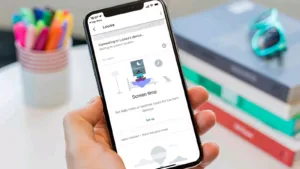
Image source: TechAdvisor
9. Restrictions on Apps
This is an additional feature for controlling screen time. This feature allows you to restrict the amount of time your child uses a specific App or a collection of Apps. You can limit apps one by one or by their category, such as Social.
10. App and Content Restrictions
The App and Content Restrictions feature allows you to restrict all apps or specific ones simply with a single button. You can also press the switch once more to lift the restriction.
11. Social Media Content Detection
This parental control feature allows you to look for sensitive keywords in your child’s communications on social media and messaging applications. To do this, you first generate keywords and then select the applications you wish AirDroid to keep track of for those keywords. Also, there is an option for taking screenshots whenever those keywords are used on any of the selected social media platforms.
The app has an AI Keyword Assistant that recommends keywords based on your description of your goals.
12. Detection of Inappropriate Images
This feature scans all new images for unsuitable content, including nudity and adult content.
13. Website Restrictions
This feature will record your child’s browsing history, enabling you to track the kinds of sites they access. From this section, you can select and restrict any websites.
14. Supervision of Calls and SMS
When activated, this feature helps you to oversee all calls and text messages on your child’s device.

Image source: Freepik
See Other Posts on this Site
How to Configure AirDroid Parental Control
To set up the app, install “AirDroid Parental Control” on your phone and “AirDroid Kids” on your child’s device, then connect them using a binding code. The procedure is simple.
First, get the AirDroid Parental Control from either the Google Play Store or the App Store. You will then choose whether the installation is for your phone or for your child’s phone. AirDroid app provides a practical online guide with visuals that simplifies the setup process.
After installing the correct apps on each phone, you can connect the two devices using the given connection code.
After successfully connecting both phones, you must activate permissions for the activities you wish to monitor. It may take some time, as you need to enable each permission separately. However, once completed, you will have one of the most effective parental control applications.
More about AirDroid Parental Control App
The user interface is uncluttered, with the most essential features accessible from a single screen. You receive a 3-day free trial to experience the features, and when you decide, you can choose from their easy payment options (monthly, quarterly, or annually).
The parental control application is compatible with Android 7.0 and above (accommodating low-budget devices commonly used by children) as well as iOS 13 and above. Some of its special features like SMS tracking, full notification synchronisation and screen mirroring are exclusive to Android.
AirDroid Parental Control: Costs and Subscriptions
AirDroid Parental Control works on a subscription basis following a 3-day free trial. The subscription packages are as follows:
- $9.99 per month for 2 devices.
- Quarterly: $19.99 (approximately $6.66/month). This option supports up to 10 devices.
- Yearly: $59.99 (approximately $4.99/month). This option supports up to 10 devices.