Mechanical keyboards are absolutely everywhere these days. Tech YouTubers won’t stop talking about them, Reddit threads stretch for miles discussing switch preferences, and suddenly everyone’s desk setup looks incomplete without one. But the reality? Most people buying mechanical keyboards have zero idea what they’re actually getting themselves into. In this article, we’ll walk you through the pros and cons of mechanical keyboards.
Pros of Mechanical Keyboards
The Typing feels Better
Regular keyboards feel like mashing buttons on a TV remote. Those rubber dome things underneath each key are basically tiny balloons that collapse when pressed. Zero feedback, no consistency, and definitely no satisfaction. Mechanical keyboards work completely differently – each key sits on top of its own little spring-loaded mechanism.
The difference hits immediately. Keys respond with precise feedback that lets fingers know exactly when each keystroke registers. No more mashing the spacebar three times because it didn’t work the first time. Typing becomes rhythmic instead of hesitant. Speed improvements happen naturally because users stop second-guessing every keypress.
Professional typists regularly jump from 60 words per minute to 85+ after switching. The improvement isn’t magic – it’s just confidence. When keys provide clear feedback, typing becomes more fluid and deliberate.
The Durability is Top-Tier
Standard keyboards die in predictable ways. The Enter key stops working after six months. The spacebar develops dead spots. Letters start double-registering or not registering at all. Replacement becomes inevitable every 12-18 months with regular use.
Mechanical keyboards avoid these problems through better engineering. Each switch handles 50-100 million presses before showing wear. That’s roughly equivalent to typing every day for 20-30 years. Even accounting for heavy usage, mechanical keyboards typically outlast 4-5 membrane keyboards.
The Cons of Mechanical Keyboards
They Cost a Pretty Penny
Entry-level mechanical keyboards start around $80-90 but usually disappoint with cheap switches and flimsy construction. Decent models require $130-200 investments. Premium keyboards easily exceed $300 before adding any customization.
The costs multiply quickly. Custom keycap sets run $60-150. Specialty switches cost $40-80 per set. Artisan keycaps – single decorative keys – sell for $30-100 each. The mechanical keyboard community actively encourages this spending through forums dedicated to expensive builds and rare components.
Budget alternatives exist but typically use knockoff switches that defeat the purpose. Cheap mechanical keyboards often feel worse than quality membrane keyboards while costing three times as much.
 They are Noisy
 They are Noisy
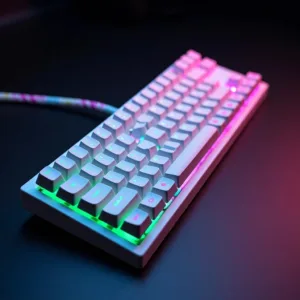
Mechanical keyboards are genuinely disruptive. Blue switches produce 70+ decibels per keystroke – equivalent to normal conversation volume. Multiply that by 60-100 keystrokes per minute and the noise becomes overwhelming.
Open offices turn into acoustic nightmares when multiple people use mechanical keyboards. Conference calls suffer from constant background clicking. Roommates and family members complain about late-night typing sessions. Many workplaces specifically prohibit mechanical keyboards due to noise complaints.
Even “silent” mechanical switches generate more noise than membrane keyboards. The physical mechanisms create unavoidable sound that carries through walls and floors.
They Take up So Much Space
Mechanical keyboards are absolute units. They typically measure 1.5-2 inches thick and weigh 3-5 pounds. This bulk creates multiple practical problems that buyers don’t anticipate.
Desk space becomes scarce. The keyboard footprint forces monitors further back and eliminates mouse room. Laptop users struggle with the dramatic size difference when switching between portable and desktop setups. Travel becomes problematic due to weight and bulk.
The height also creates ergonomic issues. Wrists rest at awkward angles without palm supports, potentially causing strain during extended use. Factor in the cost of quality wrist rests when budgeting for mechanical keyboards.
Mechanical Keyboards in Reality
Gaming Claims vs Reality
Competitive gamers swear by mechanical keyboards for consistent response times and anti-ghosting capabilities. The benefits exist but apply mainly to professional-level play. Casual gamers rarely notice performance differences during typical gaming sessions.
The durability advantage matters more than precision for most gaming scenarios. WASD keys get hammered during long sessions, and mechanical switches handle the repetitive stress better than membrane alternatives. However, this only applies to heavy gaming usage patterns.
Office Work Realities
Writers and programmers often report reduced hand fatigue during extended typing sessions. The tactile feedback helps maintain consistent rhythm and prevents the muscle uncertainty that develops from pressing mushy keys repeatedly.
But workplace noise restrictions kill the practical benefits. Many professional environments ban mechanical keyboards due to disruption concerns. The investment becomes worthless if the keyboard can’t be used where it’s needed most.
Pros and Cons of Mechanical Keyboards in a Nutshell
The mechanical keyboard decision depends entirely on specific circumstances and priorities. Heavy typists working from home genuinely benefit from improved tactile experience and durability. Enthusiasts who enjoy customization and don’t mind ongoing costs will appreciate the extensive options available.
Casual users who occasionally type emails and browse websites probably won’t notice enough difference to justify the expense and complications. The Pros and Cons of Mechanical Keyboards are real but not universal or automatic. Testing different switch types before purchasing prevents expensive mistakes and buyer’s remorse.