
When you purchase through links on our site, we may earn an affiliate commission. This doesn’t affect our editorial independence.
Android phone vs iPhone has been a topic of discussion for almost twenty years, and at present, Apple (maker of iPhones) holds the largest market share in the mobile phone sector. Based on user experience, Google-powered devices are arguably superior because of the flexibility they offer to their users. With customizable options and various new helpful features, Android devices have been offering a personalised experience.
In comparison, iOS may appear more restricted because of Apple’s rigid ecosystem. With iOS 26, Apple launched a new chapter in mobile software and is now closer to bridging the gap with Android through the rollout of many much-awaited new features. Nonetheless, the tech giant has much ground to cover. From the absence of scrolling screenshots to the unavailability of expandable storage, here are seven Android features that make iPhones look inferior.
1. Android Devices Delivers Superior Screenshots
The screenshot experience on the iPhone needs improvement, primarily because of UI elements cluttering the display. While you can deactivate full-screen screenshot with iOS 26, the overall experience remains less than ideal. Additionally, a key Android feature, scrolling screenshots, has not yet been included on the iPhone. For those unfamiliar, scrolling screenshots enable the capture of an image, text, or any other content that exceeds the size of your phone’s screen.
Although this feature has been available on Samsung’s Galaxy devices for some time, it is now accessible on all Android phones. This function can be useful for writing down an extensive recipe or recording lengthy conversations, as it enables users to capture all details in one shot without needing to combine several images.
Regrettably, users of Apple devices miss out on this feature, at least in part. iPhones can take scrolling screenshots, but only during document viewing or web surfing. Surprisingly, this cherished feature is still absent in its latest OS, the iOS 26.
2. Storage Expansion
Storage can pose a problem when buying an iPhone, particularly since getting one with a higher storage raises the phone’s cost significantly. Customers can choose a less expensive model with reduced storage. However, they are limited to the same internal memory for the duration of the phone’s use. A 256GB choice may seem insufficient now, especially considering Apple’s commitment to iPhone gaming. In this respect, Androids excel since they allow for storage expansion using an SD card that fits in the SIM tray.
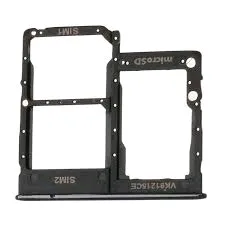
Image source: repairoutlet.co.uk
You can save apps, images, files, and other items in your external storage. Although it is worth noting that this option is no longer available on some Android devices. However, recent mid-range Android models, such as the Samsung Galaxy M36, which was launched in July 2025, feature this option. For Apple devices, the sole option is iCloud+, which provides 50GB of cloud storage for $0.99 per month. Keep in mind that Apple will also remove your iCloud backup if the iOS on your device is outdated.
3. Better App Cloning on Android Devices
There may be instances when you wish to have multiple accounts for an App on your device. This may be required to manage a business or for other personal reasons. However, handling them can be a nuisance on an iPhone, as changing accounts demands logging in and out each time. The procedure is more straightforward for Android users. Through app cloning, users can generate copies that distinct data and accounts or profiles. This feature has been integrated into phones powered by Google for several years.
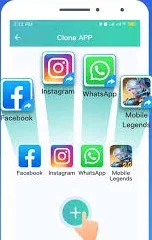
Image source: consumerhauwei.com
Every brand offers its unique take: Samsung has Dual Messenger, Huawei offers App Twin, and OnePlus has Parallel Apps. However, they all fulfil the same purpose. They enable the duplication of apps such as Instagram, WhatsApp, and YouTube. For iPhone users looking for a third-party option, Apple’s stringent security measures pose challenges in replicating apps. A potential solution is to use your web browser to sign in to multiple accounts simultaneously, although this method is less streamlined than what Android provides.
4. Using Multiple Profiles
Having multiple profiles on one phone can be helpful in situations such as sharing your device with a relative, allowing one of your children to use it, or simply keeping your personal and professional accounts separate. Android device makers Google, Huawei, and Xiaomi allow multiple users to have accounts on their devices. Each account preserves its own data, passwords, and files.
This ensures a secure and safe experience for all users. Regrettably, this is yet another feature that the iPhone lacks. The closest feature to having multiple users on your iPhone is Guided Access. It works by restricting your device to a single app, and this limits the type of content accessible. It’s a method Apple uses to safeguard children on the internet with the iPhone.
5. Enhanced Split-Screen and Multitasking Capabilities on Android Devices
iPhones may be considered slightly inferior to Android devices in terms of multitasking. This is because Android devices are designed to handle multiple tasks simultaneously. However, for Apple users, the OS layout does not permit this. A significant benefit of owning an Android phone is the split-screen feature, enabling users to operate two applications simultaneously, separated by a middle section.
This feature is helpful during video calls while using another app simultaneously or while studying, as it can enhance productivity. Apple devices do not support split-screen functionality. However, the Split Screen – Dual Window iOS app allows for the simultaneous use of two different browser tabs. Yet, this does not equate to running two applications concurrently.
See Other Posts on this Site
How to Screenshot on Mac: Quick and Easy Guide
Organic Marketing and Social Media Advertising: Which Approach Works Best?
6. Reverse Wireless Charging on Android
Since Apple introduced wireless charging capability with the iPhone X, it has gained wide adoption, evolving from a luxury to a key charging solution. However, iPhones still lack the ability for reverse wireless charging. Reverse wireless charging enables your phone’s battery pack to charge other devices. This mode of charging is highly convenient for gadgets such as earbuds or smartwatches.
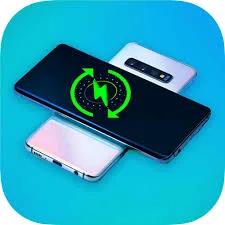
Image source: playgoogle.com
It is just as simple as attaching these devices to the rear of your phone. Many recent flagship and even mid-range Android smartphones include this feature, including models from the Galaxy S, Pixel, and OnePlus series. Although rumours suggest that the iPhone 17 Pro would include reverse wireless charging, this feature was not included in the final version. Apple was reportedly testing this feature, but the absence of a rollout suggests they were not pleased with the results.
7. Enhanced Desktop Mode for Android Devices
Users of Android phones may not realise that their devices can display a full desktop interface. The feature provides a PC-style interface when your phone is connected to an external display. It enables other features such as using a mouse, allowing you to drag and drop files, and do various tasks.
Device makers offer various iterations of this desktop feature. Motorola offers Ready For, while Huawei has Desktop Mode, and Samsung offers Samsung Dex. Among all these options, Samsung Dex arguably offers the best experience and has consistently done so for years, due to its partnership with Microsoft.
Currently, the only feature available when an iPhone is connected to an external display is to mirror its screen. Speculation suggests that a desktop mode for iPhones is being developed. However, it remains a feature exclusive to Android, which currently embarrasses the iPhone.